 Freeware Backup Tool For
Clarion Developers
Freeware tool to Zip Up your App/DCT files. New zip files are always created each time you press Go. I don't delete anything, I don't overwrite anything, housekeeping
(deletion of old zips) is your job, having said this - use at your own risk...
Why was I built ?
Some developers are very good at backing up their applications and dictionaries on a daily basis others are a little lazier - my developer fell into the latter category and
wanted a quick fix - better safe than sorry......
What do I do ?
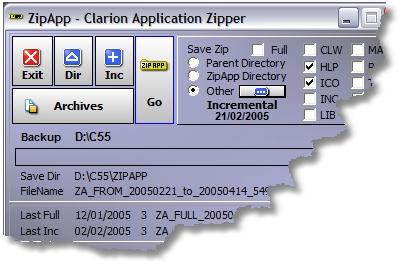
I backup your application files App/Dct/Upg (without exception) and optionally hlp, ico, prj, tpl,
tpw, inc, map, txa - I save the new zip file to either the zipapp directory, backup directory
(parent) or AN Other directory you specify.
HLP includes HLP, HSC, SHG, CHM, HM* and EZH
ICO includes ICO, GIF, JPG and BMP
TPL includes TPL and TRF (registry files)
TXA includes TXA and TXD/TXR (exported/text files)
I do a recursive backup without exception - thus any subdirectories will also be included in
the backup. I can do a full backup of all selected file types or only those modified from a
specified date (Incremental) ...
Some of my users have asked if I can allow user defined settings like *.tps etc.... No, this
would be contrary to the license agreement of LSZip because my main job is as a compression
tool however, I have been okayed by Friedrich (in my present form, so I am legal to be
distributed by my developer).
My developer has also said this not why I was conceived!
I could do plenty more but the reason for my very existence is single click/fast backup - nothing
complicated, not too much stuff, so i'm used often rather than rarely...I usually have only HLP, ICO and TPL checked to supplement APP/DCT... and am run several times a
day...
I do NOT
I do not replace your full backup methodology - I am a quick backup option to save the valuable stuff particularly - APP/DCT file types as often and quickly as possible...
ZipApp is designed to be a supplement NOT replacement for your full backup strategy.
So what horrible things have my users said about me ?
"The way I use it is to do a quick backup a couple of times a day and then I backup the zipapp files to a CD burner each evening. This gives me a wonderful sequence of
archives. If we ever get to a meeting together the steaks are on me".
"This sure is a great little app. It has saved my skin more than once!"
What lout built me ?
A Clarioneer who wanted to give something back for all the help he has received from the Clarion community - without which I wouldn't have been built - Darron C Pitman
How was I built ?
Backup/Zip utility LSZip Lindersoftware
Versioning EasyVersion IngasoftPlus
Button Styling Easy3d IngasoftPlus
Link to web site Hyperactive Capesoft
Icons XPicons Gitano
File compression of ZipApp exe ASPack
Program Installer SetupBuilder Lindersoftware
ZipApp icon created using Microangelo Impactsoftware
Picture above created using TNT ec-software
Background image of ZipApp - MS Image Composer
Special Thanks
To Friedrich Linder of Lindersoftware for allowing me to distribute this utility...
Last Revision
1.3a - Allows for a different parent directory to be set for Registry/TPL files.
1.2e - Button enhancements - thanks to Ingasoftplus - Easy3D.
1.2d - UPG.tps - As App/Dct - back up without exception following a change.
1.2c - HLP - HM2/3 changed to HM*.
1.2b - HLP now also includes HM2 files.
1.2a - New option to save zip files to user definable directory. Added Full Check Box to quickly clear Incremental Date. Un-checking switches back to Incremental and
enters Today's Date + screen beautification.
1.1g - Minor screen modifications to Housekeeping + Double Click to Open zip.
1.1f - Minor screen modifications + Message when no matching records to zip.
1.1e - Added CHM & CLW options - updated screen fonts/background.
Freeware Backup Tool For
Clarion Developers
Freeware tool to Zip Up your App/DCT files. New zip files are always created each time you press Go. I don't delete anything, I don't overwrite anything, housekeeping
(deletion of old zips) is your job, having said this - use at your own risk...
Why was I built ?
Some developers are very good at backing up their applications and dictionaries on a daily basis others are a little lazier - my developer fell into the latter category and
wanted a quick fix - better safe than sorry......
What do I do ?
I backup your application files App/Dct/Upg (without exception) and optionally hlp, ico, prj, tpl,
tpw, inc, map, txa - I save the new zip file to either the zipapp directory, backup directory
(parent) or AN Other directory you specify.
HLP includes HLP, HSC, SHG, CHM, HM* and EZH
ICO includes ICO, GIF, JPG and BMP
TPL includes TPL and TRF (registry files)
TXA includes TXA and TXD/TXR (exported/text files)
I do a recursive backup without exception - thus any subdirectories will also be included in
the backup. I can do a full backup of all selected file types or only those modified from a
specified date (Incremental) ...
Some of my users have asked if I can allow user defined settings like *.tps etc.... No, this
would be contrary to the license agreement of LSZip because my main job is as a compression
tool however, I have been okayed by Friedrich (in my present form, so I am legal to be
distributed by my developer).
My developer has also said this not why I was conceived!
I could do plenty more but the reason for my very existence is single click/fast backup - nothing
complicated, not too much stuff, so i'm used often rather than rarely...I usually have only HLP, ICO and TPL checked to supplement APP/DCT... and am run several times a
day...
I do NOT
I do not replace your full backup methodology - I am a quick backup option to save the valuable stuff particularly - APP/DCT file types as often and quickly as possible...
ZipApp is designed to be a supplement NOT replacement for your full backup strategy.
So what horrible things have my users said about me ?
"The way I use it is to do a quick backup a couple of times a day and then I backup the zipapp files to a CD burner each evening. This gives me a wonderful sequence of
archives. If we ever get to a meeting together the steaks are on me".
"This sure is a great little app. It has saved my skin more than once!"
What lout built me ?
A Clarioneer who wanted to give something back for all the help he has received from the Clarion community - without which I wouldn't have been built - Darron C Pitman
How was I built ?
Backup/Zip utility LSZip Lindersoftware
Versioning EasyVersion IngasoftPlus
Button Styling Easy3d IngasoftPlus
Link to web site Hyperactive Capesoft
Icons XPicons Gitano
File compression of ZipApp exe ASPack
Program Installer SetupBuilder Lindersoftware
ZipApp icon created using Microangelo Impactsoftware
Picture above created using TNT ec-software
Background image of ZipApp - MS Image Composer
Special Thanks
To Friedrich Linder of Lindersoftware for allowing me to distribute this utility...
Last Revision
1.3a - Allows for a different parent directory to be set for Registry/TPL files.
1.2e - Button enhancements - thanks to Ingasoftplus - Easy3D.
1.2d - UPG.tps - As App/Dct - back up without exception following a change.
1.2c - HLP - HM2/3 changed to HM*.
1.2b - HLP now also includes HM2 files.
1.2a - New option to save zip files to user definable directory. Added Full Check Box to quickly clear Incremental Date. Un-checking switches back to Incremental and
enters Today's Date + screen beautification.
1.1g - Minor screen modifications to Housekeeping + Double Click to Open zip.
1.1f - Minor screen modifications + Message when no matching records to zip.
1.1e - Added CHM & CLW options - updated screen fonts/background.