


 © Management Computer Systems (Ferndown) 2023
 Local Government Software at its very Best!


 Click to email











 01202 890659
 Asset Register
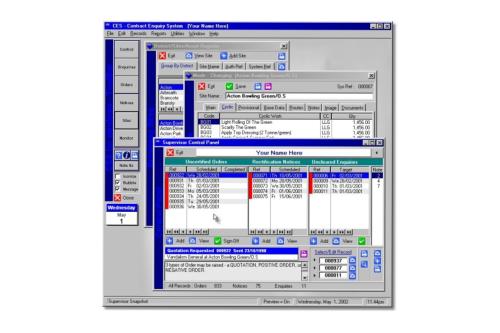
Logging of all sites and operations to be carried-out at each site - lower level working data may also be
recorded and summarised. Each site can accommodate work from multiple cost centres. Any number of site
notes may be added to each location. Each site may be linked to digital images or directly linked to maps held
on MapInfo/GIS via MapX ocx. A large number of reports are available and "ready-to-go" - ranging from the
production of bills of quantity, contract evaluation to full period worksheets and workbooks. A what-if sub-
system is provided to test changes to the asset register prior to permanent modification. For audit purposes,
CES automatically tracks all changes to the Asset Register. Provisional work may also be logged and analysed
against each site - this facility is important for estimating provisional/contingency budgets. Further facilities
allow users to log information down to plot or house level.
Day-to-Day Management
Enquiries/Customer Care Sub-System - Any number of user definable enquiry types may be set-up to record
everything from Vandalism and Complaints to Item Faults and Accident Reports. Any number of notes and letters
may be logged against each record. The Enquiry Sub-System available within CES is as powerful as any Enquiry
System on the Market and has been designed in such a way that it may be used by the Department as a whole to log
all incoming calls of any type. A separate multi-user program may also be purchased to front-end enquiries for use
by general admin staff or on a front-desk (see CES Front-Desk). The included reports not only assist with customer
care but analyse it via aged enquiry summaries and pie charts based on raised and completed dates.
Orders - several types are available and the stage of processing is automatically tracked. An order wizard makes
raising an Order a breeze, via Order Profiling the process of raising an Order is even further "speeded-up". Any
number of operations may be logged against each order and a memo field is used to allow users to write additional
notes. Details are automatically recorded of when and who raised/last modified each record. Orders may be re-
allocated to any contractor on file, CES automatically calculates prices based on the selected contractors schedules
of rate, a further facility allows an overall percentage uplift to be added - an uplift may also be added on a line by
line basis. If CESLink is used the time and date of download to the contractor is automatically logged.
Notices - several types/stages are available. Any number of operations to be rectified may be logged against each
notice and the user may select each operation from a full list or from a list displaying only those items carried-out
at the specified site. Standard notes may be set-up in CES to further speed-up the creation of new notices. A
digital picture may be attached to each notice and printed as required. To keep training to a minimum, the same
wizard used to create orders is used when creating notices, view screens allow notices to be viewed in a myriad of
ways. If CESLink is used by the contractor, the time and date of download is automatically recorded.
Contract Monitoring - A percentage of site records may be randomly selected and created on CES. In-built reports
provide full analysis based on recorded standards (A to D). On-screen data-entry is swift employing buttons to enter
standards against each operation type. A site note may be added at time of completion of the monitoring sheet.
Contractor Monitoring - CES can also produce full period worksheets which may be sent to contractors and/or used
by clients to monitor contractor performance. Notice summaries may also be used as a further indicator of
contractor performance.
Orders and Notices may be cross-referenced to enquiries.
Payments
The Payments Sub-System provides for the automatic calculation of actual payments and production of management
reports, including budget forecasts based on actual and committed amounts. CES not only handles multiple
contracts, but also multiple contractors working on each contract. CES also handles single sites with multiple cost
centres, contracts with differing start/finish dates, multiple Sets of Schedules of Rate, 12 and/or 13 payment
periods, average or actual period payments. Powerful ready to run reports also show budget and uncommitted
balances down to cost centre level. Links can be built to directly send information to your corporate financial
system. Further facilities are provided for special end-of-year functions, rate uplifts, and budget management.
Asset Register
Logging of all sites and operations to be carried-out at each site - lower level working data may also be
recorded and summarised. Each site can accommodate work from multiple cost centres. Any number of site
notes may be added to each location. Each site may be linked to digital images or directly linked to maps held
on MapInfo/GIS via MapX ocx. A large number of reports are available and "ready-to-go" - ranging from the
production of bills of quantity, contract evaluation to full period worksheets and workbooks. A what-if sub-
system is provided to test changes to the asset register prior to permanent modification. For audit purposes,
CES automatically tracks all changes to the Asset Register. Provisional work may also be logged and analysed
against each site - this facility is important for estimating provisional/contingency budgets. Further facilities
allow users to log information down to plot or house level.
Day-to-Day Management
Enquiries/Customer Care Sub-System - Any number of user definable enquiry types may be set-up to record
everything from Vandalism and Complaints to Item Faults and Accident Reports. Any number of notes and letters
may be logged against each record. The Enquiry Sub-System available within CES is as powerful as any Enquiry
System on the Market and has been designed in such a way that it may be used by the Department as a whole to log
all incoming calls of any type. A separate multi-user program may also be purchased to front-end enquiries for use
by general admin staff or on a front-desk (see CES Front-Desk). The included reports not only assist with customer
care but analyse it via aged enquiry summaries and pie charts based on raised and completed dates.
Orders - several types are available and the stage of processing is automatically tracked. An order wizard makes
raising an Order a breeze, via Order Profiling the process of raising an Order is even further "speeded-up". Any
number of operations may be logged against each order and a memo field is used to allow users to write additional
notes. Details are automatically recorded of when and who raised/last modified each record. Orders may be re-
allocated to any contractor on file, CES automatically calculates prices based on the selected contractors schedules
of rate, a further facility allows an overall percentage uplift to be added - an uplift may also be added on a line by
line basis. If CESLink is used the time and date of download to the contractor is automatically logged.
Notices - several types/stages are available. Any number of operations to be rectified may be logged against each
notice and the user may select each operation from a full list or from a list displaying only those items carried-out
at the specified site. Standard notes may be set-up in CES to further speed-up the creation of new notices. A
digital picture may be attached to each notice and printed as required. To keep training to a minimum, the same
wizard used to create orders is used when creating notices, view screens allow notices to be viewed in a myriad of
ways. If CESLink is used by the contractor, the time and date of download is automatically recorded.
Contract Monitoring - A percentage of site records may be randomly selected and created on CES. In-built reports
provide full analysis based on recorded standards (A to D). On-screen data-entry is swift employing buttons to enter
standards against each operation type. A site note may be added at time of completion of the monitoring sheet.
Contractor Monitoring - CES can also produce full period worksheets which may be sent to contractors and/or used
by clients to monitor contractor performance. Notice summaries may also be used as a further indicator of
contractor performance.
Orders and Notices may be cross-referenced to enquiries.
Payments
The Payments Sub-System provides for the automatic calculation of actual payments and production of management
reports, including budget forecasts based on actual and committed amounts. CES not only handles multiple
contracts, but also multiple contractors working on each contract. CES also handles single sites with multiple cost
centres, contracts with differing start/finish dates, multiple Sets of Schedules of Rate, 12 and/or 13 payment
periods, average or actual period payments. Powerful ready to run reports also show budget and uncommitted
balances down to cost centre level. Links can be built to directly send information to your corporate financial
system. Further facilities are provided for special end-of-year functions, rate uplifts, and budget management.



 © Management Computer Systems (Ferndown) 2023